Coding Agents Are the Base Agent
A practical mindset for picking up coding agents, even if you don't code. Destinations, maps, tools, and why every other agent is a coding agent in disguise.
On this page
If you got into a cab and started barking turn-by-turn directions at the driver (left, left, right, right, straight, no go back, no take this exit), you and the driver would both end up frustrated and twenty minutes late. The driver knows the streets. You know where you’re going. The deal is you tell them where, and you maybe steer past the worst traffic on the way.
That’s basically how I’ve come to think about coding agents after a year and change of running Claude Code, Codex, Cursor, and whatever launched last Tuesday. Most people use them like a chatbot. Turnstile back-and-forth. Type a thing, get a thing, ask a follow-up, get another thing, fight with the output. Whenever I catch myself in that loop, it means I’ve skipped a step. The tool was set up to do something different and I’m forcing it back into search-bar shape.
This post is the mindset shift, without the woo-woo. No “AGI is around the corner.” No “surrender to the new paradigm.” Three concrete moves: destination, map, toolbox. Plus the frame underneath that makes them work: coding agents are the base agent.
1. destination, not directions
The biggest change for me was treating the agent as goal-driven instead of step-driven.
“Write a function that takes a list of users and filters by email domain” is step-driven. You’re telling the driver to turn left. Then you’ll tell them where to turn next. Then again. Then they’ll do something you don’t like and you’ll undo it. You’re both annoyed and you’ve burned half your context window (the agent’s working memory) arguing.
“Here’s the spec. Here’s the failing test. Here’s the failure mode that bothers me. Make the test pass without breaking anything else. Tell me what you changed and why.” That’s destination-driven. You said where you’re going. You gave it constraints. You told it how you’ll check. Now it can plan a route.
Same shape, different work. Step-driven: “Find me three competitors for HealthFirst.” Destination-driven: “Read the engagement brief. Find HealthFirst’s three closest competitors in U.S. retail health. For each, give me revenue, market share, and any major news from the past twelve months. One-page brief with a source URL for every fact.”
The shape of the two interactions is different, and the shape is doing most of the work:
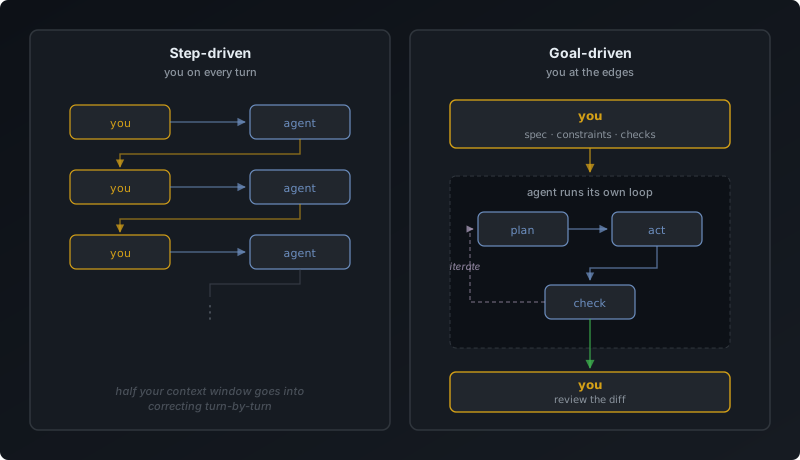
In step-driven, you’re a node in every turn. In goal-driven, you bookend an agent loop that runs on its own.
The proof that this is how the tools want to be used: both Claude Code and Codex now ship Plan mode. Plan mode is the agent saying “let me show you the route before I drive it.” It’s the product team admitting that spec-first / goal-first / plan-first is the loop that works, and the chat-turnstile was a stepping stone we needed to get off.
I wrote about this from other angles in coding-agents-made-me-better-programmer and vibe-coding-or-not-youre-going-to-use-coding-agents. The short version is the same: write what should exist, let the agent figure out the steps, push back when the plan drifts, ship.
Practical move if this is new: next time you catch yourself doing five chat turns to get one piece of code right, stop. Open a scratch file. Write the spec instead. Two paragraphs. Inputs. Outputs. Failure modes. What’s out of scope. Hand the spec back. Watch the difference.
2. structure is the map
OK, the agent has a destination. Now what?
Cars don’t drive in featureless deserts. They drive on roads, and those roads are mapped, signed, and named, which is how the driver knows where to turn even if you’ve never told them. Your project directory is the road network. The map is the structure.
If you have a pile of files lying around with no obvious shape, the agent does one of two things. It loads everything into context (slow and expensive) or loads nothing (faster but useless). Both are bad. The fix is mundane: build a structure, then build a map.
The map, for Claude Code, is a CLAUDE.md at the root of the repo. For Codex, it’s AGENTS.md. For Cursor, .cursorrules. Same idea, different name. This is the file the agent reads first when it opens your project. It tells the agent what this project is, where the important code lives, what conventions you’ve decided on, the hard rules (“never do X”), and where to look when something breaks.
If your project isn’t code, the same shape works. What the engagement is, where the source documents live, your firm’s terminology, the hard rules (“never reference the previous client’s name”), where to look when something seems off.
I built Novalis, my terminal emulator, this way. The CLAUDE.md there is load-bearing. It’s where the lessons from the first hundred mistakes live so the next hundred agent sessions don’t repeat them. When something goes sideways in a build, the fix is often a CLAUDE.md change, not a code change. The next agent that opens that part of the codebase now knows the rule.
A few things people get wrong on this:
The map is not a one-time write. Structure changes as the project changes. A CLAUDE.md you wrote four weeks ago is probably already stale. When you find yourself correcting the agent on the same thing three times in a row, that’s the signal: the map needs an update. Add the rule. Move on.
Most agent errors are map problems, not agent problems. This took me a long time to internalize. When Claude Code does something dumb in my repo, my first instinct used to be “ugh, the model is bad today.” Now it’s “what’s missing from the structure that would have prevented this.” Almost always there’s a missing piece: a stale doc, a misleading filename, a convention the agent had no way to know about. Fix the structure and the error stops happening. You’re the cartographer. Given a starting map, the agent will draw a better one than you could alone. But you have to draw the first one.
This is the civil engineer reflex I argued for in missing-toolbox-for-agent-builders. Civil engineers don’t trust the simulation blindly. They develop a feel for what wrong output looks like, so when the computer says a 40-story building needs a 2-inch beam, they know to push back before re-running the numbers. The agent version of that reflex: when the output is wrong, suspect the structure you handed the agent before suspecting the model. Software engineering as a discipline doesn’t teach this. Civil engineering does. Steal the habit.
Knowledge bases stack. Personal CLAUDE.md in your home directory for preferences across every project. Project-level one for this specific repo. Subdirectory-level one for a tricky subsystem. They compose; the most specific one wins. Use the layering.
Examples beat descriptions. When you write conventions in CLAUDE.md, point at a working file instead of describing the pattern in words. “Follow the pattern in userService.ts” beats two paragraphs of prose. Same show-don’t-tell move I wrote about in vibe-coding-or-not-youre-going-to-use-coding-agents.
The unsexy summary: most of the work I do that makes the agent productive isn’t prompting. It’s writing the map.
3. tools are what you build
You start out using the agent to do tasks. After a while, you notice patterns. The same kind of work, over and over. Search across the codebase for a specific shape. Pull data from one system, transform it, drop it into another. Reformat an artifact a specific way. Run a check, then a fix, then a verification.
If you keep doing those by hand every time you sit down, you’re leaving the best part of the deal on the table.
The agent is there to do the task. It’s also there to build the tool that does the task next time. Concretely:
- The agent writes the script that does the codebase search you keep asking for. Now you run a command instead of a chat turn.
- The agent builds the small pipeline that pulls API A, transforms it, dumps it into format B. Next time you need that data, you run the pipeline.
- The agent encodes a recurring check (“every PR touching
src/auth/*needs a corresponding test”) as a hook or a CI step. The check runs without you. - You package a multi-step workflow you keep asking for as a Skill or a slash command. Anyone on the team can run it.
A weekly competitive scan that runs Friday morning. A quality check that verifies every date in a draft against the source documents. An engagement-onboarding workflow that reads a new data room and produces a one-page brief.
This is where coding agents compound. You’re building the durable thing that does the task next time, on its own, at three in the morning if you want.
the ladder: coding agents are the base agent
The three moves above all rest on one fact: coding agents have tools, and tools are how you build things that aren’t LLM calls.
Coding agents are the substrate every other agent gets built on top of. A research agent is a coding agent whose tools are arXiv, paper readers, and experiment runners. A math agent is a coding agent whose tools are SymPy and Lean. A DevOps agent is a coding agent whose tools are kubectl and Terraform. A support agent is a coding agent whose tools are ticket search and draft composers.
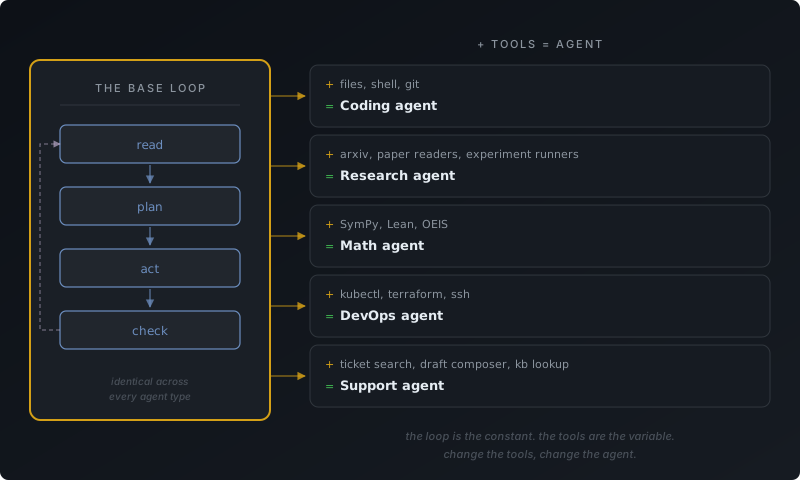
The loop is the constant. The tools are the variable. Change the tools, change the agent.
That’s why “coding agent” being a confusing name doesn’t matter. It’s the agent with the most general tool set, so it’s the agent that can become any other kind of agent if you point it at the right tools. If you’re a non-programmer and you’ve been reaching for ChatGPT or any AI product built on top of these models, you’ve been reaching for a downstream subset. The coding agent is the upstream thing all of them are built on. Pick one up.
I made this argument with the receipts in building-chimera. The decomposition there is Agent = Provider + Tools + Loop + Environment. Get the base right and you get the rest for free.
You’re climbing a ladder, whether you noticed or not.
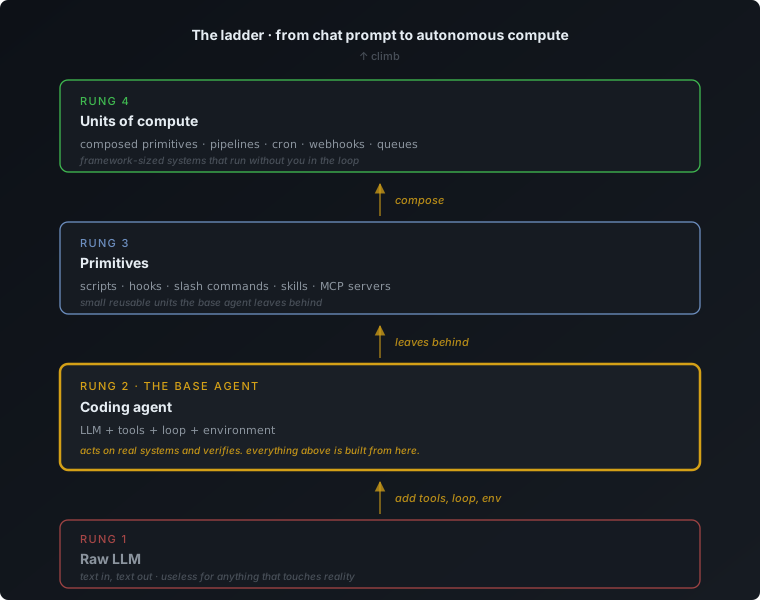
A raw LLM is text in, text out. Useful for chat, useless for anything that touches reality. Add tools, a loop, and an environment, and you’ve built the smallest thing that can act on a real system and check what happened. That’s the base agent.
A base agent running in a project for a while leaves things behind: scripts, hooks, slash commands, skills, MCP servers. Each one is a primitive. Small, reusable, deterministic where it can be, and calling out to an LLM only where it has to.
Primitives compose into units of compute: pipelines that run on cron (a scheduler), on webhooks, on queues. Framework-sized pieces that do real work without you in the chat loop. The LLM is one component inside them, not the whole system.
Your day shifts as you climb. Less “ask the agent and hope,” more “run the thing and verify.” The non-deterministic chunk of your work shrinks in proportion to how much actually gets done. The chatbot loop is the bottom rung. Most people stop there. Climbing is the point.
putting it together
Three concrete moves:
- Tell the agent the destination, not the turns. If you’re doing five chat turns to get one thing right, you skipped the spec.
- Build the map. Update it when it goes stale. The map is your project structure plus the docs the agent reads first.
- Let the work leave tools behind. Every repeat task is a candidate for automation.
And the frame they sit on: coding agents are the base agent. Tools build primitives. Primitives compose into units of compute that run without you in the loop.
All of it is ordinary engineering hygiene with a new collaborator who writes faster than you can read and will make confident mistakes in your codebase if you don’t set them up well.
If you want one starter move: open your most active project right now. Write a CLAUDE.md or AGENTS.md at the root. Five sections, ten lines each. What the project is. Where the files live. Conventions and terminology. Hard rules. Troubleshooting. Commit it. Next time you sit down with an agent, watch how much less of the conversation goes into context-setting. That’s rung one to rung two.
The chatbot loop is the shallow end. You don’t have to live there.